

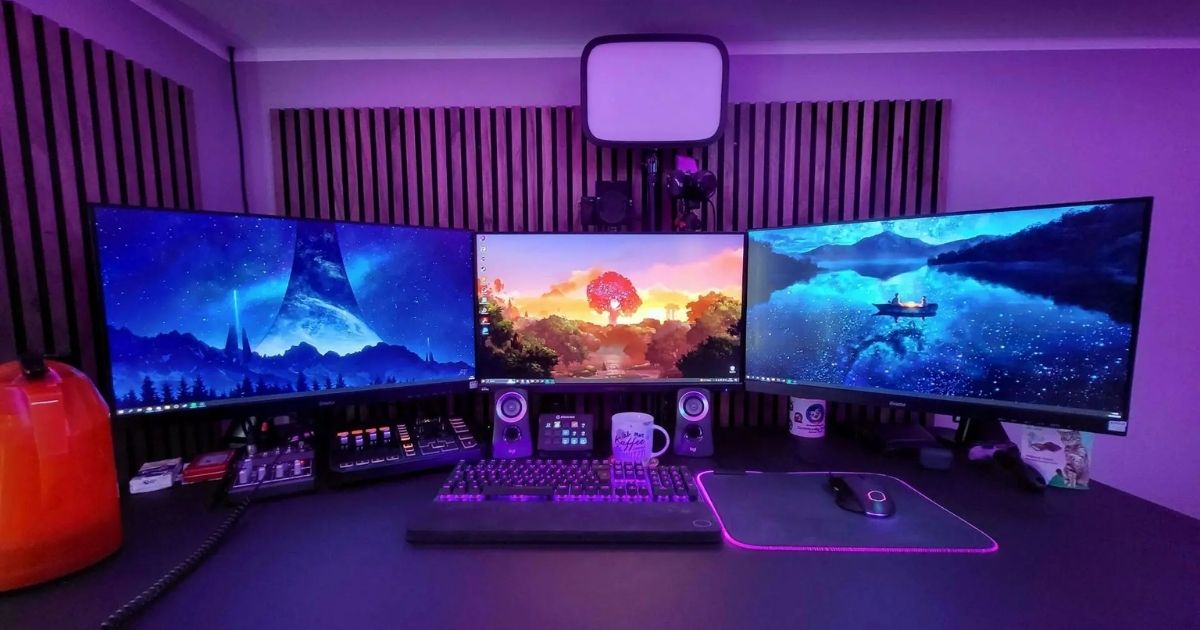
Whether you game a few hours a week or spend entire weekends lost in virtual worlds, one thing stays the same: a well-built gaming setup changes everything. It is the difference between frustrating lag and buttery-smooth framerates, between a sore back after an hour and comfortable sessions that stretch deep into the night.
This guide walks you through every element of building the best gaming setup, from picking the right platform to managing cables and adding personal touches that make your space truly yours. No filler, no fluff, just actionable advice based on what actually works.
The Foundation: Choosing Your Gaming Platform
Before you spend a single dollar on a desk or chair, you need to decide what you are actually gaming on. This decision shapes every other choice you make.
Gaming PC gives you the highest performance ceiling, full upgrade flexibility, and access to the widest game library. You control the CPU, GPU, RAM, and storage, which means you can tailor performance to your exact budget. Entry-level builds start around $500–$600, while high-end rigs can reach several thousand dollars.
Gaming Console (PlayStation, Xbox, Nintendo Switch) offers a plug-and-play experience with exclusive titles and a lower up-front cost. Consoles are ideal if you prefer simplicity and do not want to spend time configuring hardware.
Gaming Laptop sits in the middle, portable, capable, and compact, but offers limited upgrade paths compared to a desktop PC.
Pick the platform that matches your gaming style, budget, and the types of games you enjoy most. Once that decision is locked in, everything else falls into place naturally.
How to Create the Perfect Gaming Space
Your gaming space is more than a room with a screen in it. It is a performance environment, a comfort zone, and a creative outlet. Here is how to build it component by component.
1. Choose the Right Gaming Desk
Your desk is the foundation of your entire setup, and getting it wrong is expensive. Before you buy, think about how much space you have and what you plan to put on it: one monitor or two, speakers, a headphone stand, a streaming microphone, a keyboard, and a mouse pad all need room.
Look for a desk with:
- A broad, flat surface with enough depth to place your monitor at least 20 inches from your face
- Built-in cable management channels or grommets to keep wiring tidy
- Storage drawers or shelves for controllers, games, and accessories
- Sturdy construction that does not wobble under heavy peripherals
L-shaped gaming desks are excellent if you need more surface area or want to use a corner. Height-adjustable standing desks are worth the investment for longer sessions, standing periodically relieves pressure on your back and wrists and helps prevent repetitive strain injuries like carpal tunnel syndrome, which is common among long-term gamers.
Choose a desk that fits your room without crowding it. Measure twice, order once.
2. Get a Comfortable Gaming Chair
No component in your setup affects your long-term health more than your chair. You will spend hundreds, possibly thousands, of hours sitting in it. A low-quality plastic chair will cause back pain within months. A proper ergonomic gaming chair is an investment in your well-being, not just your comfort.
When shopping for a gaming chair, prioritize these features:
- Lumbar support: Either a built-in lumbar curve or an adjustable cushion keeps your lower spine in a healthy position
- Adjustable armrests: Arms that can move up, down, forward, and inward prevent shoulder tension
- High backrest: Supports your upper back and neck during extended play
- Recline function: Being able to lean back between matches lets your spine decompress
- Breathable material: Mesh or perforated leather prevents overheating during long sessions
If you game on a console from a couch or floor, consider rocker gaming chairs, which provide solid back support in a low-profile, reclining form.
3. Set Up Your PC Gaming Monitors
Your monitor is your window into the game. Choosing the wrong one means you leave performance, and enjoyment, on the table.
Key specs to understand:
- Refresh rate: A 144Hz monitor is the sweet spot for competitive gaming. 240Hz or higher benefits fast-paced games like first-person shooters. 60Hz is fine for casual or single-player gaming.
- Response time: Look for 1ms or 5ms response time to minimize ghosting in fast-moving scenes.
- Resolution: 1080p is the baseline. 1440p (QHD) offers a sharp visual upgrade without demanding extreme GPU power. 4K is stunning but requires powerful hardware to run smoothly.
- Panel type: IPS panels deliver better color accuracy and viewing angles. TN panels have faster response times but weaker color. VA panels offer deep contrast ratios for cinematic experiences.
Monitor placement matters just as much as the specs. Position your screen at eye level or just slightly below, roughly 20–30 inches from your face. Use a VESA monitor arm or stand to achieve this. If you are running a dual-monitor setup, a multi-screen mount keeps both displays at the right height and angle without taking up desk space.
Curved monitors are worth considering for 27-inch screens and larger, they create a more consistent viewing angle and add an immersive quality to open-world and simulation games.
4. Choose the Right Peripherals
Peripherals are where your gaming setup becomes personal. They directly affect your reaction time, comfort, and in-game performance.
Keyboard:
Mechanical keyboards are the gold standard for gaming. They provide tactile feedback, faster actuation, and far greater durability than membrane alternatives. For wireless options, look for zero-lag 2.4GHz wireless rather than Bluetooth. Customizable keycaps and RGB backlighting are a bonus, but the switch type underneath determines how the keyboard actually feels.
Gaming Mouse:
A gaming mouse is more than a preference, it is a performance tool. Look for:
- High DPI range (10,000+ for adjustable sensitivity across different games)
- Advanced optical laser sensor for precise tracking
- Ergonomic shape that fits your grip style (palm, claw, or fingertip)
- Customizable side buttons for in-game macros
Mouse Pad:
An extended mouse pad gives your mouse consistent glide across the full desk surface. Hard pads are faster; soft cloth pads offer more control. Most competitive players prefer cloth.
Gaming Headset:
Choose a headset with a driver size of 45mm or larger for better sound quality. Noise-canceling ear cups improve focus in shared spaces. For team-based games, a clear directional microphone is essential. Decide between wired (lower latency, no charging needed) and wireless (clean desk, freedom of movement) based on your preference.
5. Invest in Good Lighting and Ambiance
Lighting has a bigger impact on your gaming experience than most people realize. Poor lighting causes eye strain, especially during long night sessions, while well-planned ambient lighting enhances immersion and makes your setup look professional.
Bias lighting, LED strips placed behind your monitor, reduces the contrast between the bright screen and the dark wall behind it. This noticeably reduces eye fatigue during extended play.
RGB LED strip lighting under your desk, along shelves, or behind your PC case ties your whole setup together visually. Most modern RGB systems sync with your games, changing color in real time based on in-game action.
Smart lighting from brands like Philips Hue or NZXT lets you set scenes, sync lighting with audio, and adjust brightness and color temperature with a phone or voice command.
Blackout curtains are underrated. They eliminate glare on your monitor from windows, which is one of the most common causes of visual discomfort during daytime gaming.
Combine ambient lighting with task lighting, a small lamp angled at your keyboard, to keep your eyes comfortable without flooding the room with harsh overhead light.
6. Manage Cables and Organization
A messy setup is not just an eyesore, tangled cables can trip you up, damage connectors, and restrict airflow around your PC. Good cable management takes an afternoon but pays off for years.
Start with these strategies:
- Cable sleeves and velcro ties: Bundle cables running along the same path into neat groups
- Under-desk cable trays: Mount power strips and excess cable length underneath the desk surface, completely out of sight
- Cable clips and adhesive mounts: Route individual cables along the edges of your desk legs or the underside of the surface
- Wireless peripherals: Switching to wireless keyboard, mouse, and headset immediately eliminates the most visible cable clutter
Plan your cable routes before your setup is fully assembled. It is much easier to manage cables when the desk is clear than to untangle a finished mess.
7. Improve Your Audio Setup
Audio is the most underinvested part of most gaming setups, and upgrading it delivers one of the biggest improvements in immersion. Positional audio, being able to hear exactly where footsteps, gunshots, or other cues are coming from, is a genuine competitive advantage in many games.
For headphone users:
A dedicated external DAC (Digital-to-Analog Converter) or audio interface dramatically improves the quality of both your headphones and your microphone. Even a budget DAC/amp combo makes high-end headphones sound significantly better than plugging straight into your motherboard.
For speaker setups:
A stereo soundbar or a 2.1 speaker system with a subwoofer provides rich bass and spatial sound for casual and single-player gaming. Position speakers at ear level, angled slightly toward your listening position.
Acoustic treatment:
If you stream or record, acoustic foam panels on the walls nearest your setup reduce echo and room noise. This makes your microphone audio cleaner and more professional without requiring a studio.
8. Personalize Your Ultimate Gaming Setup
A gaming setup that looks good is one you actually want to sit in. Personalization is not vanity, it makes your space feel intentional and motivating.
Some popular ways to add personality:
- Wall art and gaming posters: Showcase your favorite games, esports teams, or game art
- Collectibles and figurines: Action figures, limited-edition statues, and gaming memorabilia add character to shelves and desk corners
- Color scheme: Choose a consistent color palette across your peripherals, lighting, and furniture. Dark setups, white setups, and natural wood tones are the most popular choices right now
- Custom keycaps: A set of themed or color-matched keycaps instantly transforms your keyboard into a centerpiece
- Cable color coordination: Matching your cable colors to your RGB theme adds a polished, intentional look
Your setup should reflect you. Whether you prefer a clean minimalist aesthetic or an RGB-heavy battlestation, consistency in color and style is what separates a thoughtful setup from a random collection of hardware.
FAQ’s
How much does a good gaming setup cost?
A solid entry-level gaming setup typically costs between $800 and $1,500, covering a PC or console, monitor, chair, desk, and basic peripherals. High-end setups can exceed $5,000.
What is the most important part of a gaming setup?
The gaming PC or console is the core component that determines performance. However, your chair arguably affects your long-term health and comfort more than any other piece of hardware.
Do I need RGB lighting for a gaming setup?
No, RGB is purely aesthetic. However, bias lighting behind your monitor does reduce eye strain, making it both a style and a health choice.
What is the best monitor size for gaming?
A 24-inch to 27-inch monitor at 1440p resolution hits the sweet spot for most PC gamers, offering sharpness and performance without demanding excessive GPU power.
How do I keep my gaming setup organized?
Use under-desk cable trays, velcro cable ties, and adhesive cable clips to route wires neatly. Switching to wireless peripherals eliminates most visible cable clutter instantly.
Is a mechanical keyboard worth it for gaming?
Yes. Mechanical keyboards are more responsive, more durable, and more satisfying to type and game on than standard membrane alternatives. They are worth the investment for any serious gamer.
Can I build a good gaming setup on a budget?
Absolutely. Prioritize your chair, monitor, and input devices first. You can start with a 1080p 144Hz monitor and a budget mechanical keyboard and upgrade other components over time without losing the foundation of a solid setup.
Final Thoughts
Building the best gaming setup is not something you need to do all at once. Start with what matters most for your comfort and performance, your chair, your monitor, and your peripherals, and build outward from there. Add lighting, upgrade your audio, and personalize your space over time as your budget allows.
The best gaming setup is not necessarily the most expensive one. It is the one that is comfortable enough to keep you playing without pain, fast enough to keep up with your skills, organized enough that nothing distracts you, and personal enough that walking into the room puts you in the right mindset. Take it one component at a time. Every upgrade you make is a step closer to the setup you actually want.